

You can test the throttle body temperature sensor on your 1989-1991 3.9L V6 Dodge Ram van using nothing more than a basic multimeter. It's a quick way to find out if the sensor's still doing its job —or if it's shot.
In this tutorial, I'm gonna walk you through two resistance tests: one with the sensor cold, and another after it's been heated up. Once you've done both, you'll know for sure whether the TB temp sensor is working right or if it's fried and needs to be replaced.
Contents of this tutorial:
APPLIES TO: This tutorial applies to the following vehicles:
- Dodge Ram B150 Van 3.9L V6: 1989, 1990, 1991.
- Dodge Ram B250 Van 3.9L V6: 1989, 1990, 1991.
Symptoms Of A Bad Throttle Body Temperature Sensor
When the throttle body temp sensor quits working, it's gonna trigger the check engine light and this trouble code will get set:
- Code 23: Throttle Body Temp Sensor Voltage Too Low or Too High.
But that's just the beginning —it also messes with how the engine runs, especially when you're trying to start it back up while it's still warm.
These are the most common symptoms of a bad TB temp sensor:
- Hard starts: The engine struggles to fire up after quick stops —like running into a store.
- Rough idle: The engine shakes or doesn't idle smoothly after a warm restart.
- Stalling: The engine shuts off right after you restart it while it's still hot.
- Hesitation or surging: You feel a delay or jump when hitting the gas after a warm start.
- Longer cranking: You've gotta crank it longer than normal (this is known as a "hard start") to get it going after the engine's been shut off warm.
Odds are the engine starts up just fine first thing in the morning —but once it's warm or has been running for a bit, restarting it is difficult. That's a dead giveaway the sensor's feeding the wrong temp info to the computer.
When this sensor fails, it throws the fuel injection computer (called the Single Board Engine Controller —SBEC) off its game. It might tell the computer the throttle body's freezing cold when it's actually hot —or the opposite. That affects the air/fuel mixture the computer is trying to fine-tune, especially during warm re-starts, when vaporized fuel builds up and makes it tough to fire the engine up again.
What Does the Throttle Body Temperature Sensor Do?
This sensor mounts right on the throttle body. Its main job is to track the throttle body's temperature. That info really comes into play when you shut down a hot engine and then try to restart it not long after.
After shutdown, engine heat soaks into the throttle body. That heat raises fuel temperature (the fuel that flows thru the throttle body on its way to the fuel injectors), causing it to vaporize more —which can make restarts tricky, leading to stalling, rough idle, or hard starting.
The computer depends on this sensor to command the fuel injectors to add more or less fuel when starting the engine. The hotter the throttle body is, the more fuel the injectors need to deliver —so the engine fires up smoothly, without sputtering or stalling.
This sensor also works double duty. Since the system doesn't have a separate intake air temp sensor, the computer uses the throttle body temp reading as a substitute. That helps it figure out the air temp and keep the air/fuel ratio dialed in.
Important Initial Checks
Before you start testing the throttle body temp sensor's resistance, take a minute to knock out these quick visual checks:
- Inspect the sensor's wiring harness. Look for frayed wires, cracked insulation, or any bare spots where the insulation's worn through or peeled off.
- Examine the connector carefully. Is it cracked or broken? That small U-shaped metal retaining clip (also called the lock clip) should be in place.
- Check the sensor itself. The top's made of plastic, and it can split or break clean off the metal base if it's been installed using the wrong tool.
Missing Metal Locking Clip: On these older Dodge V6 vans, the TB temp sensor connector locks into place with a metal clip —same style used on fuel injector connectors from that time.
If that clip's missing or the connector's damaged, the connection will not hold tight or make solid contact with the sensor pins. That's a big issue —heat and engine vibrations can shake things loose and lead to a false connection problem.
If that's what you're dealing with, just replace it. A new pigtail connector is cheap and quick to install. This is the connector's part number: WALKER PRODUCTS 270-1034.
Frayed Wires: Fraying happens when the insulation wears down and the copper strands underneath start poking out. It's a common issue in these older vans with aging engine wiring harnesses.
Exposed wires can short together and kill the sensor's signal —and that's gonna throw off temp readings and cause engine performance problems.
Check out this real-world example to see what it looks like:
- IAT Sensor Wire Insulation Problem And Wires Shorted Together (at: easyautodiagnostics.com).
Here's what you should do based on the kind of damage you're looking at:
- If the wires are badly frayed or the damage is right up near the connector, go ahead and replace the entire connector.
- If there's just a small damaged section and it's farther down the wire, you can cover it with electrical tape. It's a quick fix that'll get the job done for now.
NOTE: Electrical tape's only a short-term solution. If you want a solid, long-lasting repair, replace whatever's damaged —whether it's the wire itself, the connector, or both.
Where To Buy The TB Temp Sensor And Connector


Disclosure: As an Amazon Associate, I earn from qualifying purchases. If my tutorials help you, using these links is an easy way to support the site at no extra cost to you. Thank you!
TEST 1: Cold Temperature Resistance Check
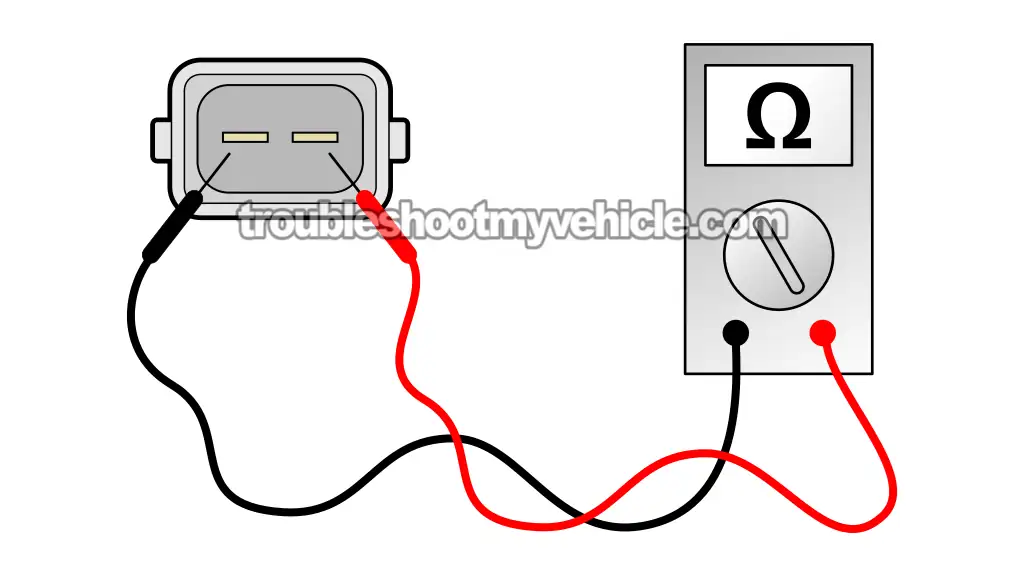
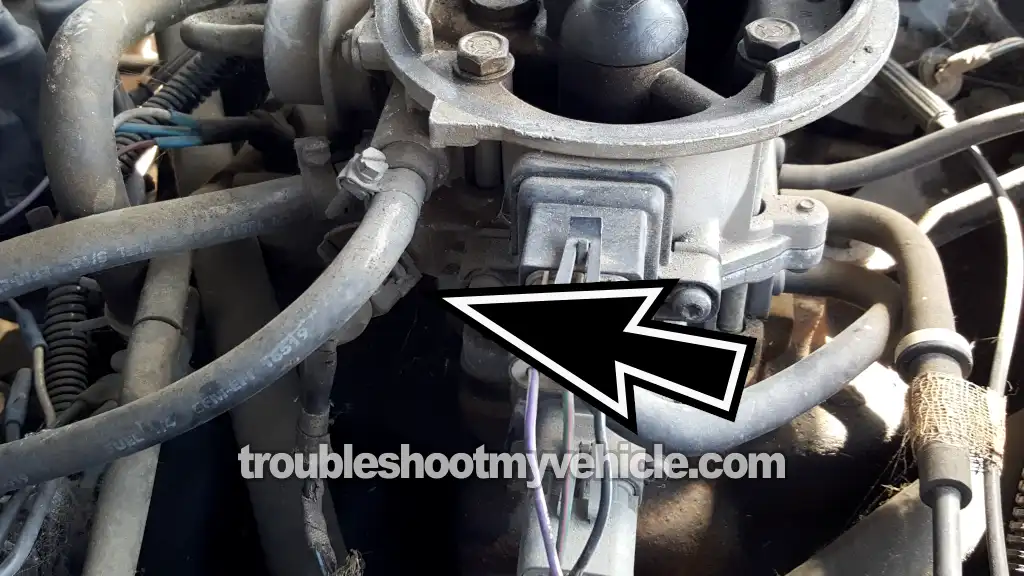
Alright, first step —take the throttle body temp sensor off the throttle body so you can check its resistance using a multimeter.
If the sensor's toast, you'll usually get one of these two results:
- Open circuit: The multimeter shows "OL" (infinite resistance). That means there's a break inside the sensor —no continuity at all.
- Short circuit: You'll get a "0 Ohms" reading, which tells you the sensor is shorted out from one pin to the other.
IMPORTANT: This test only works if the sensor is at room temperature. If the sensor is still warm to the touch, let it cool off completely before testing.
NOTE: Need a multimeter or thinking about upgrading? Here's the one I use and recommend: Tekpower TP8268 AC/DC Auto/Manual Range Digital Multimeter (Amazon affiliate link).
Let's get to it:
- 1
Unplug the TB temp sensor from its 2-wire connector.
NOTE: Check the connector closely —make sure it's not cracked or missing that little U-shaped metal clip that locks it in place. - 2
Remove the TB temp sensor from the throttle body.
NOTE: Be careful —the plastic top can crack or snap clean off when removing it. - 3
Switch your multimeter to its Ohms (Ω) setting.
- 4
Measure the sensor's resistance by placing the multimeter leads on both male terminals.
At room temperature, your reading should land between 5.6 and 14.6 K Ohms.
Now let's break down what your readings mean:
CASE 1: Multimeter shows 0 Ohms. That means the sensor's shorted out inside —go ahead and replace it.
CASE 2: Multimeter flashes OL (infinite resistance). That shows there's no continuity —the sensor's done for.
CASE 3: Resistance falls outside the indicated range. That's a strong sign the sensor isn't working right anymore.
You can double-check by running one more test. Head over to: TEST 2: Hot Temperature Resistance Check.
CASE 4: Resistance is within the expected range. If your reading's in spec, the TB temp sensor is working like it should.
You can double-check by running one more test. Head over to: TEST 2: Hot Temperature Resistance Check.
TEST 2: Hot Temperature Resistance Check
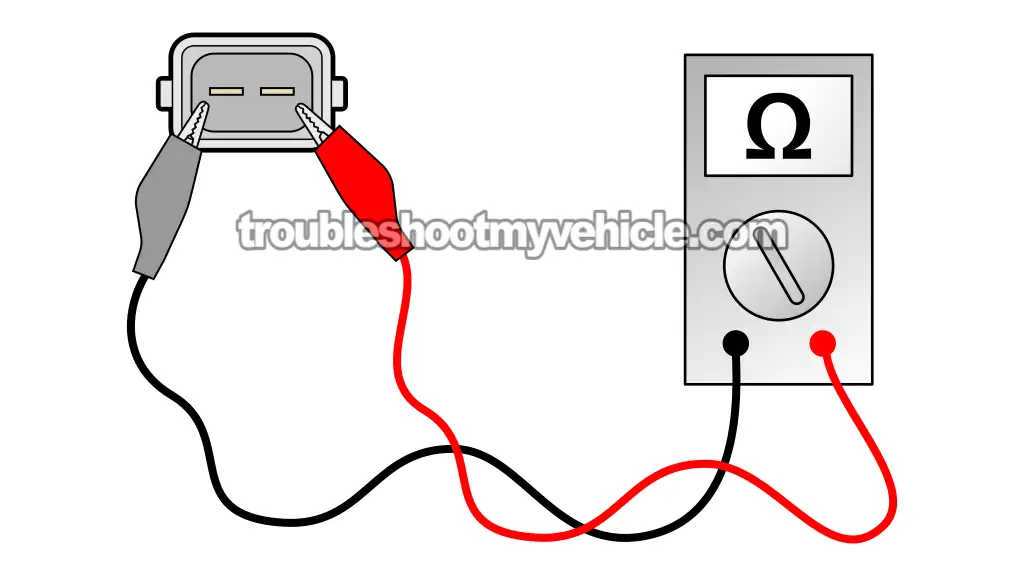
Now that you've finished the cold resistance check in TEST 1, it's time to heat things up and see if the sensor responds the way it should.
Once the sensor hits around 200°F, its resistance should drop into the 400 to 1,500 Ohms range. We're gonna get it that hot by dipping the metal tip into boiling water —since water boils at 212°F, that's perfect for this test.
If the resistance doesn't drop into that range while it's sitting in the hot water, the sensor's no good.
CAUTION: Boiling water can burn you bad, so take some basic safety steps:
- Don't touch the sensor while it's hot —let it cool before handling.
- Only submerge the metal probe of the sensor. Keep the plastic part and terminals out of the water.
- Use long jumper wires with insulated alligator clips to avoid getting near the heat. Need a set? Try these: Jumper Wires With Insulated Alligator Clips (Amazon affiliate link).
- This is an off-vehicle test —don't try it with the sensor still installed.
- Let the sensor cool down completely before putting it back on the throttle body.
Here's how to run the hot resistance test:
- 1
Connect the multimeter leads to the sensor's two pins.
IMPORTANT: Use jumper wires with alligator clips to stay clear of the heat. Don't get your hands near the boiling water. - 2
Set your multimeter to measure Ohms (Ω).
- 3
Bring a small pot of water to a boil on a stove or hot plate.
Got a kitchen thermometer? Check the temp —you want it around 200–212°F (93–100°C). - 4
Dip only the metal tip of the sensor into the boiling water.
CAUTION: Keep the plastic part and terminals dry —don't let them touch the water.
IMPORTANT: Use tongs or suspend it with a piece of wire. Never hold it with your hands. - 5
Watch the reading on the multimeter.
With the sensor heated up, the resistance should drop into the 400–1500 Ohms range. - 6
Remove the sensor and let it cool all the way down before touching it or reinstalling it.
Now, let's go over what the results mean:
CASE 1: Reading is 0 Ohms. That tells you the sensor is shorted internally. It's cooked —replace it.
CASE 2: Display shows OL (infinite resistance). That means there's an internal break —sensor's dead.
CASE 3: Reading doesn't fall within spec. That's another sign the sensor isn't working right. Time for a new one.
CASE 4: Resistance drops into the correct range. That's what you want —the sensor passed.
If this hot test checks out and it passed TEST 1, then the sensor itself is fine. If you're still seeing that code pop up, the real issue's probably in the wiring between the sensor's 2-wire connector and the fuel injection computer.
More 3.9L V6 Dodge Ram Van Tutorials
You can find a complete list of tutorials for the 3.9L V6 Dodge Ram Van in this index:
Here's a sample of the tutorials you'll find in the index:
- How To Test The MAP Sensor (1989-1990 3.9L V6 Dodge Ram Van).
- How To Test The MAP Sensor (1991 3.9L V6 Dodge Ram Van).
- How To Test The Fuel Pump (1989-1991 3.9L V6 Dodge Ram Van).
- How To Test For A Blown Head Gasket (1989-2003 3.9L V6 Dodge Ram Van).

If this info saved the day, buy me a beer!
